
Assist is the private voice assistant built into your Home Assistant smart home. Nabu is technology built by Nabu Casa to improve Assist and deliver a better voice experience. Nabu powers enhanced speech-to-text (STT), text-to-speech (TTS), and the on-device "Okay Nabu" wake word.
While Assist processes your commands, Nabu-powered STT and TTS can run locally on your system or use cloud-accelerated speech processing through Home Assistant Cloud. For details on your speech processing options, see Other Home Assistant Cloud features.
To configure Assist and set up your voice pipeline, go to Settings > Voice assistants. Learn more about Nabu.
Assist is built on top of an open voice foundation and powered by knowledge provided by our community.
Talk to Assist
-
The following device types currently support voice input via Assist:
-
You don't want Assist to listen to a wake word? You can make it start listening with the press of a button.
Supported languages
Currently, over 50 languages are supported. To check if yours is there, go to Settings > Voice Assistant and select Home Assistant Cloud. Open the Language dropdown. Select your language and check if it appears as a Conversation agent. If it's there, your language is supported.
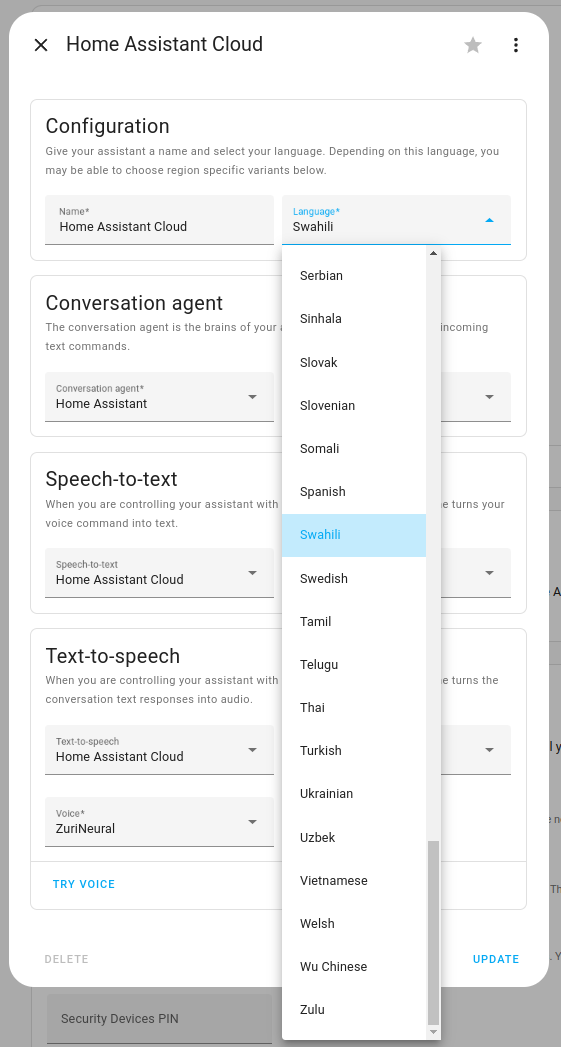
If Home Assistant Cloud is not offered as a Conversation agent, its entity may be disabled. Disabled entities are hidden from the entity list by default, so the steps below include showing them.
- In Home Assistant, go to Settings > Devices & services > Entities.
- In the Filters panel, expand Status. Select Disabled and clear Enabled, so that only disabled entities are listed.
- Search for
home_assistant_cloud. - Select each entity in the list, open its settings, and turn on Enabled.
Make an announcement
You can use Assist in automations to make an announcement. For example, it could tell you that your coffee is ready. Or use the upstairs speaker to tell your kids that dinner is ready.
Use your voice to trigger an automation
You can even define your own commands to start your automation.
Use OpenAI with Assist
You can give your voice assistant personality by using OpenAI.
We used a classic landline phone to talk to Mario, just for fun. But you can do this with any supported device. You could use your mobile phone, for example.
Year of the voice
We are hard at work to improve the voice assistant experience. We are currently at chapter 6 on our Year of the voice journey. You can now also use wake words to talk to Assist. You can even create your own wake word.
The video showcases different ways to talk to Home Assistant.
- Google Assistant via Home Assistant Cloud
- Alexa via Home Assistant Cloud
- Android Assist native integration
- ESP32 S3-BOX-3
- ESPhome-based voice assistant via Assist - using an M5Stack ATOM Echo
- VoIP-based voice assistant via Assist
- Enabling wake word
Edit this article on GitHub