A wake word is the phrase that activates your voice assistant so it starts listening for a command. To improve the voice assistant experience in Home Assistant, Nabu Casa built Nabu: technology designed to enhance Assist, powering features like the dedicated "Okay Nabu" wake word.
Trained on open-source voice samples contributed directly by the Home Assistant community, "Okay Nabu" runs entirely on-device for fast, private detection. Home Assistant Voice Preview Edition can listen for "Okay Nabu" or any of the other supported wake words listed below.
To use the "Okay Nabu" wake word with Assist, install Home Assistant and set up Assist under Settings > Voice assistants. Learn more on the Nabu page and in our guide to Assist.
Step 1
Open the integration page
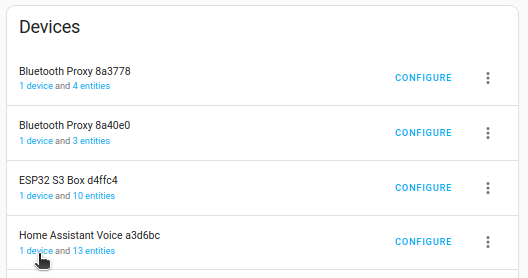
- Go to Settings > Devices & services and select the ESPHome integration.
- From the list, under Home Assistant Voice, select Device.
Step 2
Select your wake word

- On the device page, under Configuration, select your wake word.
- The available options are
Okay Nabu,Hey Jarvis, andHey Mycroft.
- The available options are
Related topics
Edit this article on GitHub